Free & Open Source 免费开源

Never lose a copied item again 再也不会丢失复制的内容

A beautiful, secure clipboard history manager for macOS. Track every text and image you copy, search instantly, and paste with one click. 100% offline, zero data collection. 一款精美、安全的 macOS 剪贴板历史管理器。自动记录复制的文字和图片,即时搜索,一键粘贴。完全离线运行,不收集任何数据。

100% Free. No ads. No tracking. MIT License. 完全免费。无广告、无追踪。MIT 开源协议。
Clipboard History Manager interface

Powerful yet simple 功能强大,操作简单

Everything you need from a clipboard manager, nothing you don't. 剪贴板管理所需的一切功能,没有多余的臃肿。

📋

Automatic Capture自动捕获

Every text and image you copy is automatically saved. Real-time monitoring with smart duplicate detection — no repeated entries cluttering your history.每次复制的文字和图片都会自动保存。实时监控并智能去重,历史记录干净整洁。

🔍

Instant Search即时搜索

Find anything you've ever copied with real-time search. Filter by text or image type. Your clipboard history is always just a keystroke away.通过实时搜索找到你复制过的任何内容。支持按文字或图片类型过滤。剪贴板历史触手可及。

📌

Pin Important Items置顶重要内容

Pin frequently used items to keep them at the top of your history. Perfect for templates, code snippets, or addresses you paste often.置顶常用内容,始终显示在历史记录顶部。非常适合模板、代码片段或常用地址。

One-Click Paste一键粘贴

Click any history item and it's instantly copied to your clipboard and pasted into the active input field. No extra steps needed.点击任意历史记录即可自动复制到剪贴板并粘贴到当前输入框。无需额外操作。

🖼️

Image Support图片支持

Not just text — images are captured too. Preview screenshots, copied graphics, and any image content right in your history panel.不仅支持文字,图片也会被捕获。在历史面板中直接预览截图、复制的图形等图片内容。

🔒

100% Private100% 隐私

All data stays in memory — nothing is written to disk, no network connections, no cloud sync. When you quit, everything is gone. Your clipboard is your business.所有数据仅存储在内存中,不写入磁盘、不联网、不云同步。退出即清除。你的剪贴板是你的隐私。

⌨️

Global Hotkey全局快捷键

Press Cmd+Shift+V anywhere to instantly summon your clipboard history. Works across all apps, even when the window is hidden.在任何应用中按 Cmd+Shift+V 即可唤出剪贴板历史。全局可用,即使窗口隐藏也能响应。

💾

Memory Management内存管理

Real-time memory usage display with automatic cleanup at 500MB. Oldest non-pinned items are removed first, so your important content stays safe.实时显示内存占用,500MB 自动清理。优先移除最旧的非置顶内容,重要内容始终安全。

📐

Always on Top窗口置顶

Toggle always-on-top mode to keep your clipboard history visible while working. Window position is remembered across sessions.切换窗口置顶模式,工作时保持剪贴板历史可见。窗口位置在会话间自动记忆。

Beautiful & Intuitive Interface 精美直观的界面

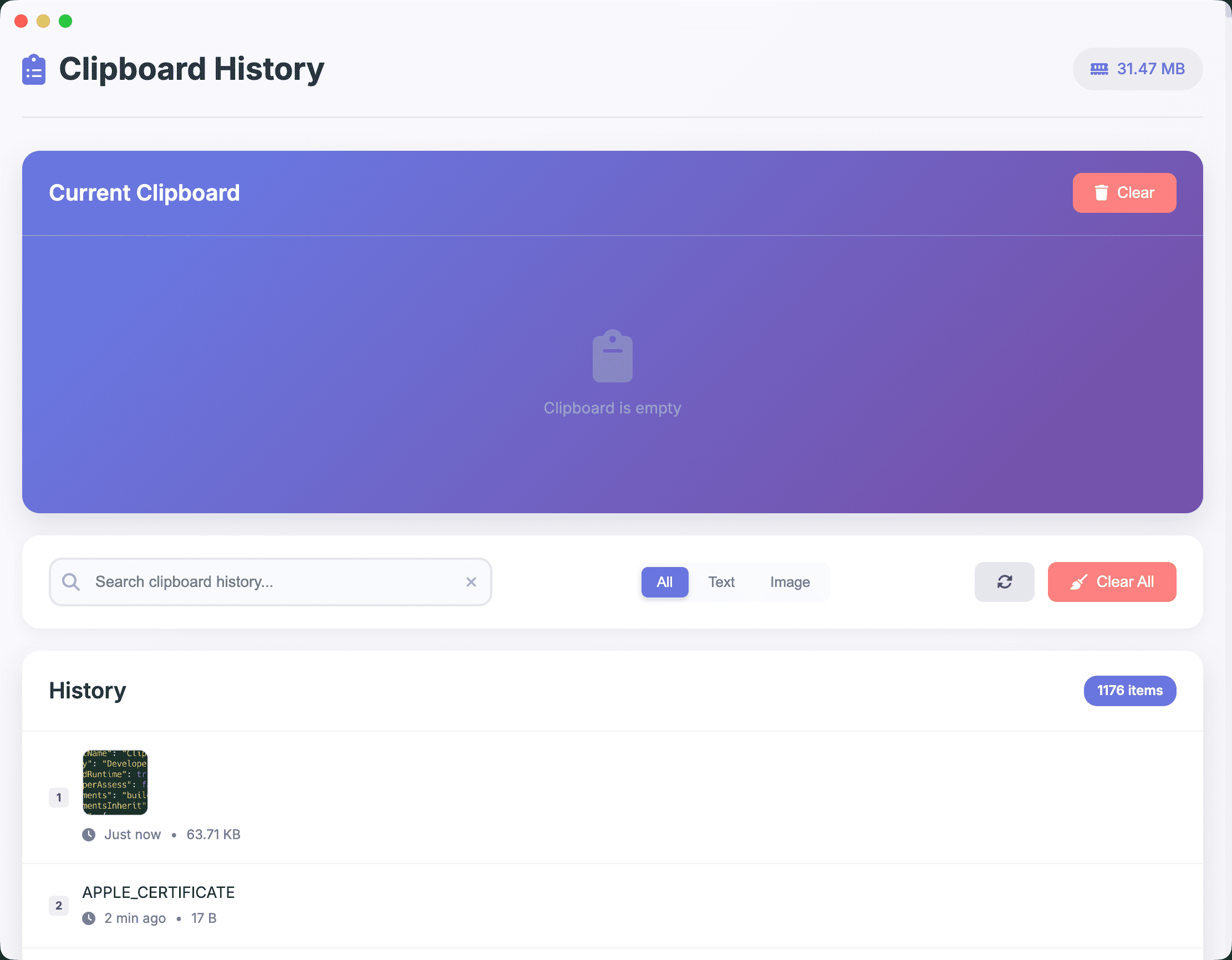
A clean, modern design with a stunning purple gradient header. Every copied item shows a preview, timestamp, file size, and numbered index for quick reference. 简洁现代的设计,配以精美的紫色渐变标题栏。每条复制记录都展示预览、时间戳、文件大小和编号索引,方便快速查找。

The current clipboard content is always visible at the top. Filter between text and images, search through your history, and manage everything from one elegant panel. 当前剪贴板内容始终显示在顶部。在文字和图片间切换过滤,搜索历史记录,在一个优雅的面板中管理一切。

Clipboard History Manager interface

Privacy First 隐私至上

Your clipboard often contains sensitive data. We built this tool to never compromise your privacy. 你的剪贴板经常包含敏感数据。我们构建这款工具的原则就是绝不泄露你的隐私。

🔐

Memory-Only Storage纯内存存储

Nothing is persisted to disk. All clipboard data lives in RAM and vanishes when the app quits. No database files, no cache, no traces left behind.不向磁盘写入任何数据。所有剪贴板数据仅存在于内存中,退出应用即完全消失。无数据库、无缓存、无痕迹。

🌐

Zero Network Access零网络访问

The app makes absolutely no network connections. No analytics, no telemetry, no update checks. Works perfectly in airplane mode.应用不进行任何网络连接。没有分析、没有遥测、没有更新检查。在飞行模式下也能完美运行。

🛡️

Secure Architecture安全架构

Built with Electron's context isolation and hardened runtime. No Node.js access in the renderer process. External window requests are blocked.使用 Electron 的上下文隔离和强化运行时构建。渲染进程无 Node.js 访问权限。阻止外部窗口请求。

📜

Open Source & Auditable开源可审计

Every line of code is open on GitHub under the MIT license. Verify the privacy claims yourself. We have nothing to hide.每一行代码都在 GitHub 上以 MIT 协议开源。你可以亲自验证隐私承诺。我们没有什么需要隐藏的。

Keyboard-First Design 键盘优先设计

Power users love shortcuts. Access everything without leaving the keyboard. 高效用户热爱快捷键。无需离开键盘即可完成所有操作。

Cmd+Shift+V Toggle clipboard history唤出/隐藏剪贴板历史
Cmd+F Focus search box聚焦搜索框
Cmd+R Refresh clipboard刷新剪贴板
Escape Clear search / close清除搜索 / 关闭

Get Started in Seconds 几秒钟即可开始使用

Download, open, done. No setup, no configuration, no account needed. 下载、打开、完成。无需配置,无需注册,开箱即用。

Free免费
Open source, forever 开源,永久免费
  • All features included包含全部功能
  • Text & image clipboard history文字和图片剪贴板历史
  • Instant search & pin即时搜索和置顶
  • Global hotkey (Cmd+Shift+V)全局快捷键 (Cmd+Shift+V)
  • 100% offline & private100% 离线运行,保护隐私
  • No data collection, ever永不收集数据
  • Apple code signed & notarizedApple 代码签名和公证
Download Latest Release 下载最新版本
macOS (Apple Silicon) macOS (Intel)

Open Source 开源项目

Clipboard History Manager is fully open source under the MIT license. Star us on GitHub, report issues, or contribute code. Built with Electron for a native macOS experience. 剪贴板历史管理器以 MIT 协议完全开源。欢迎在 GitHub 上给我们 Star、提交 Issue 或贡献代码。使用 Electron 构建,提供原生 macOS 体验。

View on GitHub 在 GitHub 上查看